
The Screenshot Blind Spot
A password in a Word document is easy to find. A password in a screenshot is where things get messy. And if that screenshot is in Japanese, Chinese, or Korean, most systems get even less reliable. In a first Japanese-only OCR test, DSI performed surprisingly well on larger printed Japanese text blocks. Not perfect, but good enough to make the blind spot visible. That is exactly why OCR in DSI matters more than it looks.
機密情報
ユーザー名: julian.demo
パスワード: Test2026!JP
アクセス権限: 機密
内部テスト用
機密情報
ユーザー名: julian.demo
パスワード: Test2026!JP
アクセス権限: 機密
内部テスト用
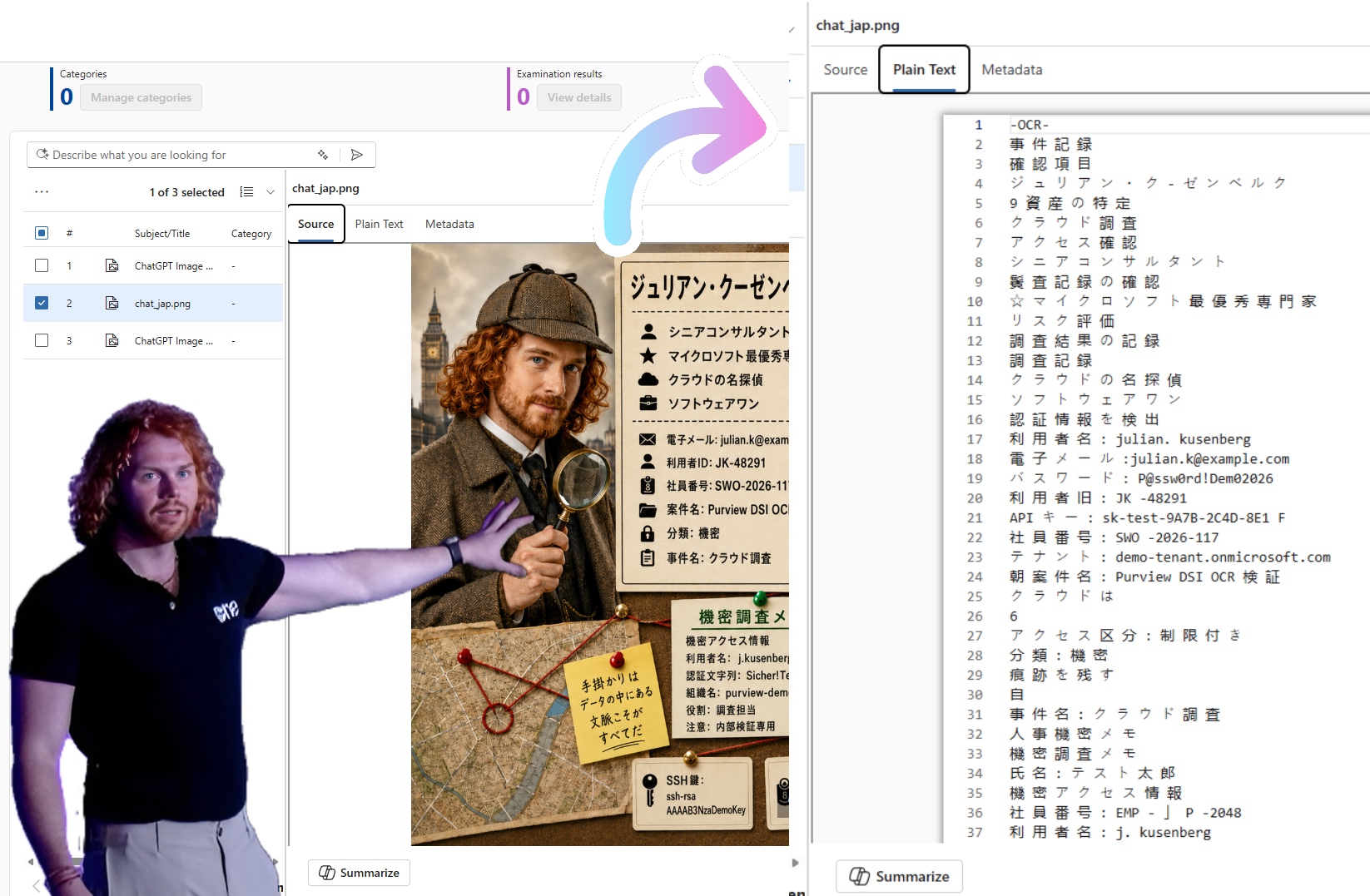
Microsoft Purview Data Security Investigations now supports OCR for supported image file types. DSI extracts text from images, screenshots, and scanned content during data preparation, then vectorizes it so it surfaces in vector search and AI analysis alongside normal text. In my first Japanese-only test image, the result was surprisingly strong: most larger printed Japanese text blocks were detected well enough to preserve the investigation context, including credentials, HR information, confidentiality markers, and external sharing restrictions. The double byte angle is not theoretical. It works well enough to matter, but analysts still need to validate the output because small labels, handwritten-style text, and exact credential strings remain challenging.
01Data is not always text
Picture a typical incident. A risky user shared several files externally. Some Office docs, some PDFs, some Teams messages. And somewhere in the noise, a screenshot called project_notes.png. No obvious name. No label. No structured metadata. Just an image.
But inside that screenshot there is an investigation memo with a username, a password, an access level, and the words „confidential“ and „internal test use“, all in Japanese.
機密情報 (confidential information)
ユーザー名: julian.demo
パスワード: Test2026!JP (password)
アクセス権限: 機密
内部テスト用
Without OCR this is just pixels. With OCR it becomes searchable, analyzable content. With AI based analysis in DSI it becomes part of the broader incident context. That is the shift.
Before OCR
The screenshot is an opaque image. No keyword match, no classification, no place in the AI pipeline. The credentials stay invisible.
After OCR
Text is extracted during data prep, vectorized, and discoverable through vector search and categorization. The credentials enter the investigation.
02The surprising part: Japanese worked better than expected
Most DLP, classification, and investigation workflows behave well when data is English, Latin script, and full of obvious words like password, confidential, or secret. Real enterprise data is not that clean. It is multilingual, pasted into images, full of product names, project codes, credentials, HR notes, and internal comments, and in global organizations, often written in double byte character set languages.
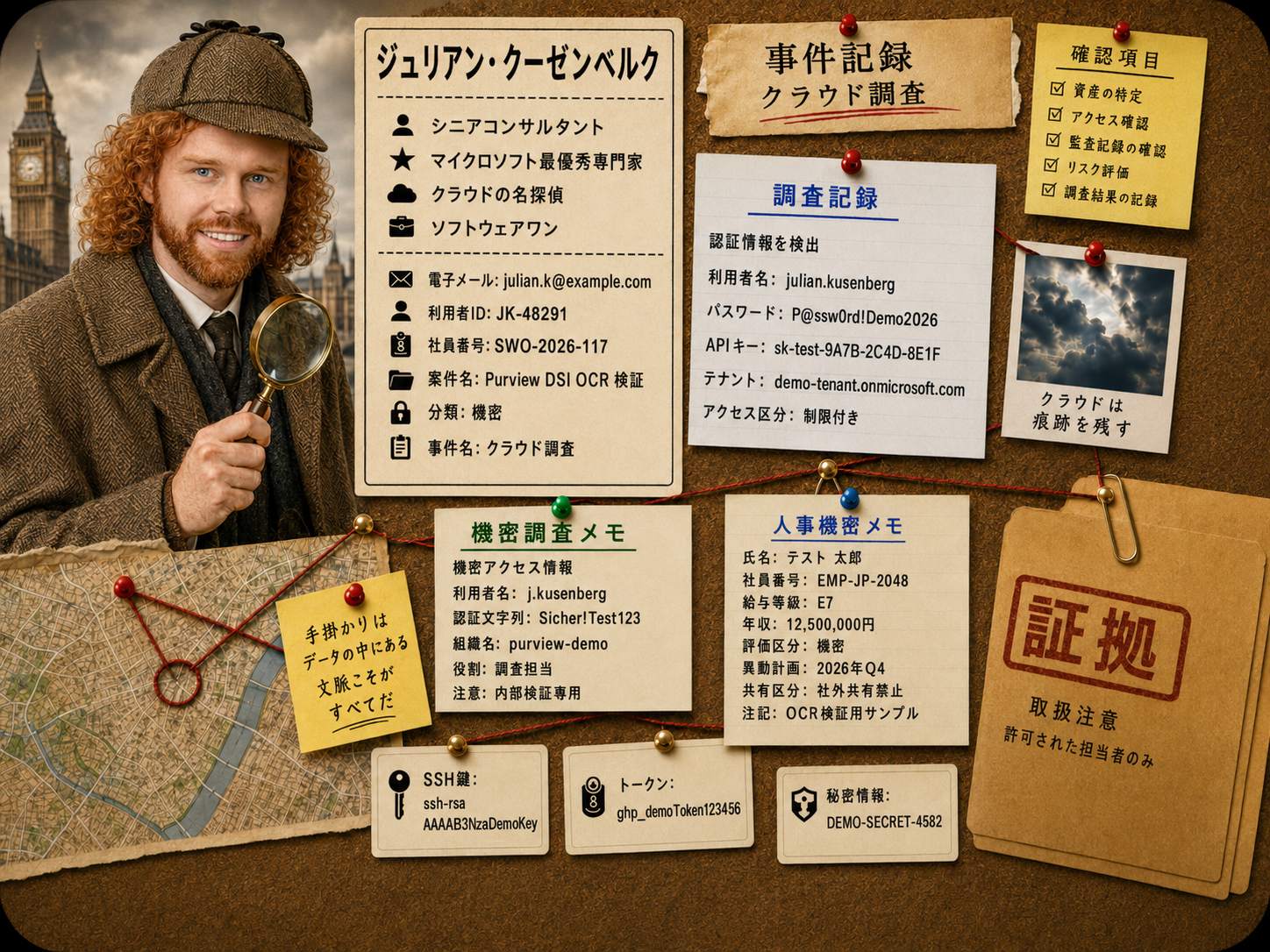
That is why I did not only test a clean English screenshot. I created a Japanese-only investigation board with credentials, HR and compensation information, confidentiality markers, external sharing restrictions, tokens, and case notes. The result was honestly better than expected. DSI OCR extracted most of the larger printed Japanese text blocks and kept enough context to identify the relevant risk categories.
This is the important part: the Japanese content was not just detected as random characters. The output preserved meaningful signals such as 認証情報を検出 for detected authentication information, 人事機密メモ for confidential HR notes, 年収 for annual salary, 機密 for confidential, and 社外共有禁止 for external sharing prohibited. For investigation and risk discovery, that is a very positive result.
認証情報を検出
利用者名: julian.kusenberg
パスワード: P@ssw0rd!Demo2026
APIキー: sk-test-9A7B-2C4D-8E1F
アクセス区分: 制限付き
人事機密メモ
年収: 12,500,000円
評価区分: 機密
共有区分: 社外共有禁止
In a rough, non-scientific review of the OCR output, I would describe the result as over 80% field-level usable accuracy across the full complex image, and significantly higher for larger printed structured text blocks. That is not a benchmark. It is a practical observation from one deliberately messy test image. But it is enough to say: Japanese OCR in DSI is not just a checkbox feature. It can surface meaningful investigation signals.
Microsoft Purview documents support for double byte character set languages, including Simplified Chinese, Traditional Chinese, Korean, and Japanese, for sensitive information types and keyword dictionaries.
Microsoft Learn: Regex & keywords for double byte character sets
There were still issues. Some Japanese characters were misread, spaces were inserted between characters, small bottom cards were harder to interpret, and handwritten-style sticky notes performed worse. But for larger, printed Japanese content, the result was much more usable than I expected.
機密 = confidential
年収 = annual salary
社外共有禁止 = external sharing prohibited
OCR検証用サンプル = OCR validation sample
03What DSI OCR actually changes
DSI is not basic keyword search. It helps cybersecurity teams use generative AI to analyze and respond to data security incidents, risky insiders, and breaches, with vector search, categorization, and examination. OCR matters because image based content can now enter that pipeline. Items are vectorized when they contain text or supported image content with extractable text, and for JPEG, PNG, and scanned PDF files, OCR extracts text automatically before vectorization.
In the AI analysis experience, vector search includes content from image based items processed through OCR, so text from screenshots and scans can be found alongside normal text based content. Vector search can also work across multiple languages.
Microsoft Learn: Use AI analysis in Data Security Investigations
The real story is not „OCR can read an image.“ It is OCR can move previously invisible image content into the investigation flow.
04Why it matters for breach & insider risk
In many investigations, the critical detail is not in the obvious place. It hides inside images and scans.
Credential screenshots
A folder that looked like low value material suddenly contains passwords and access details.
Scanned signed docs
Contracts and signatures locked inside image-only PDFs that looked unsearchable.
Whiteboard photos
Architecture, secrets, and project names captured on a phone and shared.
Embedded Teams images
Sensitive content pasted into chat as a picture instead of text.
In a breach, this changes the impact assessment. In an insider case, the difference between „user shared some files“ and „user shared screenshots containing access details“ is massive. DSI mitigation already covers resetting exposed credentials, containing exposure, removing external sharing links, remediating documents, and tracking actions. OCR makes that workflow realistic by surfacing content hidden inside images.
05Supported image formats
A meaningful test should not stop at one perfect PNG. Microsoft lists these formats as supported for file identification, metadata extraction, and OCR text extraction in DSI:
A better test set includes screenshots, compressed images, scans, technical diagrams, embedded visuals, multilingual images, and different file formats.
06DSI OCR ≠ tenant level Purview OCR
This distinction is important.
Tenant level OCR
Optional, requires pay as you go setup, and runs across Exchange, SharePoint, OneDrive, Teams, Windows, and macOS. Existing DLP, records management, and insider risk policies can then act on image content.
DSI OCR
Part of adding items to an investigation scope. The automatic OCR processing is not an additional charge, but the investigation still consumes storage and compute.
To use OCR scanning at tenant level, a Global admin must verify an Azure pay-as-you-go subscription is in place. Because it is optional, billing must be set up before OCR can be enabled.
Microsoft Learn: Learn about optical character recognition in Microsoft Purview
Billing in DSI is based on the combination of stored data volume and AI capacity. Storage is billed per gigabyte per month; compute is measured in Data Security Investigation Compute Units.
Microsoft Learn: Billing models in Data Security Investigations
Clean wording: DSI OCR does not create an additional OCR charge, but DSI investigations can still consume storage and compute units.
07This is not a DLP replacement
OCR in DSI is useful, but it does not replace DLP, sensitivity labels, classification, or governance. DLP is about prevention and control. DSI is about investigation, analysis, and mitigation. OCR simply makes the investigation more complete, and helps answer a question too few organizations ask: what sensitive information are we missing because it is stored as an image?
08Good signal, not perfect truth
The Japanese-only test was a good reminder that OCR does not have to be perfect to be valuable. For investigations, the first question is often not „did OCR extract every character perfectly?“ The first question is „did OCR make previously invisible content visible enough to investigate?“ In this case, the answer was clearly yes.
The larger Japanese printed text blocks were surprisingly well detected. DSI preserved enough meaning to identify credentials, HR information, confidentiality markers, salary context, and external sharing restrictions. That is a strong signal for analysts and a very positive result for multilingual investigations.
But exact extraction is a different standard. Credential-like strings, API keys, employee IDs, small labels, handwritten-style notes, and visually dense areas still showed OCR errors. For example, single-character mistakes in a password, token, or employee number can be critical if the goal is exact value extraction.
AI generated results may not always be accurate or complete and should be verified carefully.
Microsoft Learn: Responsible AI FAQ for Data Security Investigations
So my takeaway is positive but realistic: DSI OCR looks promising for Japanese risk detection and investigation context. It should not be treated as a perfect transcript engine. Analysts still need to validate the original evidence, especially when exact values matter.
09What I would test first
I would not start with a clean English screenshot. I would start with messy, realistic content: credentials, real business app screenshots, mixed-quality scans, internal project names, personal data, and Japanese, Chinese, and Korean text. A strong test example mixes scripts and risk categories:
パスワード: Test2026!JP
Confidential
機密情報
Annual salary
年収: 12,500,000円
External sharing prohibited
社外共有禁止
That is much closer to real life than a perfect sample file with one English keyword in the middle. The key lesson from my first Japanese-only test is simple: do not only test whether OCR sees text. Test whether it preserves enough context to make the data security risk visible.
The most dangerous data is not always hidden in dark corners. Sometimes it sits in plain sight: inside a screenshot, a scan, an image pasted into Teams. DSI OCR brings those contents into view. And based on my first Japanese-only test, it can do this surprisingly well for larger printed Japanese text. The analyst still makes the call. But at least now, the screenshot can become part of the investigation.
🔗 Sources at Microsoft
- Learn about Data Security InvestigationsMicrosoft Learn
- Use AI analysis in Data Security InvestigationsMicrosoft Learn
- Learn about the DSI workflowMicrosoft Learn
- Billing models in Data Security InvestigationsMicrosoft Learn
- Learn about optical character recognition in Microsoft PurviewMicrosoft Learn
- Regex & keywords for double byte character setsMicrosoft Learn
- DSI: Introducing OCR support (MC1301831 · Roadmap 561489)M365 Message Center

Schreibe einen Kommentar