
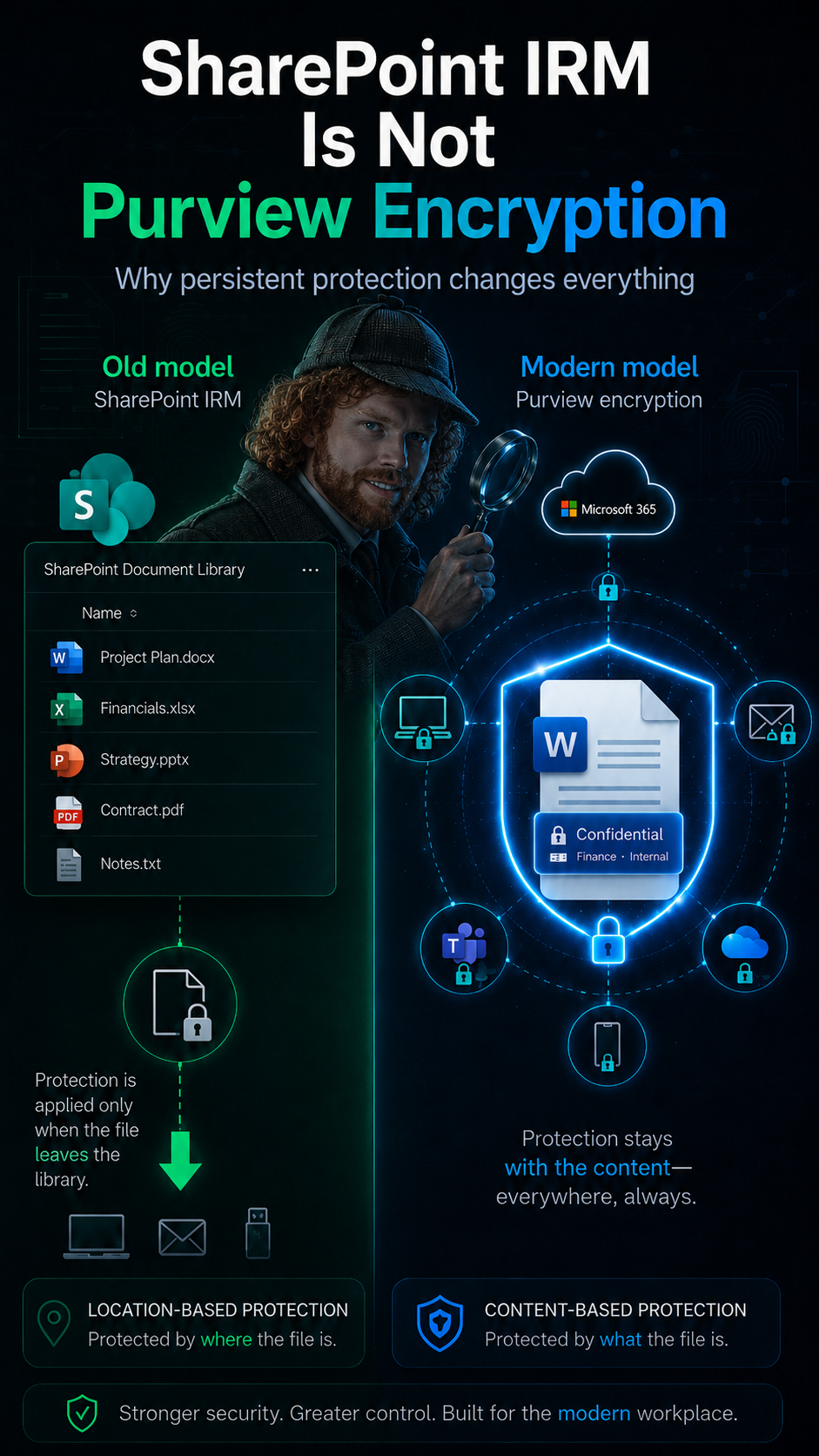
Your file is in SharePoint. So it is protected. Right?
Wrong. And this one assumption quietly breaks more Microsoft Purview projects than almost anything else.
The confusion goes back to a real Microsoft technology: classic SharePoint IRM. It built a mental model that still circulates in architecture discussions, customer workshops, and project kickoffs today. If your data protection strategy is built on that model, you are making decisions about encryption, external sharing, DLP, eDiscovery, and Copilot readiness based on something that no longer reflects how Microsoft Purview actually works.
The Myth That Keeps Coming Back
Someone remembers that protected files uploaded to SharePoint were decrypted, then governed by SharePoint permissions. From there, the conclusion is usually simple:
„Once the file is in SharePoint, SharePoint permissions take over.“
That statement is not completely random. It comes from a real Microsoft technology history. But it is the wrong mental model for modern Microsoft Purview Information Protection.
The Old World: SharePoint IRM
Classic SharePoint Information Rights Management was designed around lists and libraries. The protection was attached to the SharePoint location. A library could be configured with IRM settings, and when a user accessed or downloaded a document, SharePoint applied protection before the file left the SharePoint boundary.
Microsoft’s own migration documentation makes this explicit: with IRM-enabled lists, files are stored in SharePoint in an unencrypted format. When a user accesses a file in an IRM-protected list, the file is protected before transit.
Classic SharePoint IRM — the mental model
SharePoint was the control point. The library was protected. The document became protected when it left that library through a supported access path. That made sense for its time. But it created a mental shortcut that is still repeated today.
The Modern World: Sensitivity Labels with Encryption
Microsoft Purview Sensitivity Labels are not a SharePoint library setting. A sensitivity label can classify content, mark content, and apply encryption. When encryption is configured for documents, emails, or meeting invites, it uses Azure Rights Management from Microsoft Purview Information Protection.
That changes the model completely. The protection is no longer only tied to the place where the file currently lives. It is tied to the content itself.
SharePoint Permission
„Who can reach this file in this location?“
Sensitivity Label with Encryption
„Who is allowed to open and use this protected content, wherever it goes?“
Those two questions are related, but they are not the same question.
Location-Based vs. Content-Based Protection
This distinction matters because SharePoint permissions and Purview encryption solve different problems.
SharePoint permissions protect access to a location. They decide who can access a site, library, folder, or item. If a user does not have access to the SharePoint location, they cannot retrieve the file from that location.
Purview encryption protects access to the content. If a user somehow receives a protected document outside of SharePoint, the file still carries its protection. The client evaluates whether the user is allowed to open it and what they are permitted to do with it.
SharePoint controls access to the location.
Purview controls access to the protected content.
You need both layers — but you should not confuse them.
What Actually Happens When Encrypted Files Are Stored in SharePoint?
Modern SharePoint and OneDrive can work with sensitivity labels — but the tenant capability must be explicitly enabled. When sensitivity labels for files in SharePoint and OneDrive are enabled, users can apply labels in Office for the web, see label names in library columns, and SharePoint can process the contents of encrypted Office files and optionally PDFs.
When users download or access these files, the sensitivity label and any encryption settings remain with the file — wherever it is stored. The permissions assigned with the encryption are enforced as well.
❌ Outdated Model
„Upload to SharePoint and SharePoint strips the protection.“
✅ Modern Reality
„SharePoint recognizes and processes the protected file — while the label and encryption remain with the file.“
Why This Matters for Real Projects
This is not a technical detail. It changes how organizations should design their Microsoft Purview Information Protection architecture.
If your protection model is only based on SharePoint locations, your main question becomes: „Which site should contain this data?“ That question still matters. But it is not enough.
Modern collaboration does not stop at the SharePoint site boundary. Files are synced, downloaded, attached to emails, shared externally, copied into Teams chats, included in eDiscovery matters, evaluated by DLP policies, and surfaced in Microsoft 365 Copilot experiences.
So the better question is:
„What should happen to this content when it moves?“
A document labeled Highly Confidential should not lose its meaning because someone moved it from one library to another. It should not become less sensitive because it was downloaded. It should not depend entirely on the current storage location to remain protected.
The Governance Mistake: Treating Labels Like Prettier SharePoint Permissions
One mistake I often see is that organizations treat sensitivity labels as if they were just another layer of SharePoint permissions. They are not.
A label should represent the sensitivity and handling requirements of the content. It answers questions such as:
- What type of information is this?
- Who is allowed to access it?
- Can it be shared externally?
- Should it be encrypted, and with what usage rights?
- Should DLP react differently?
- Should eDiscovery or audit teams be able to filter based on this classification?
- Should Copilot and agents treat this content with additional care?
Sensitivity labels are not only about preventing access. They are a governance signal that can be used across workloads and policy layers — encryption, visual markings, container protection, auto-labeling, eDiscovery, DLP, Microsoft 365 Copilot scenarios, Power BI, Microsoft Fabric, and integrations through the Microsoft Information Protection SDK.
That is much bigger than SharePoint.
The Important Caveat: Do Not Ignore Limitations
This does not mean every scenario is magically solved. There are real limitations and design decisions to account for.
⚠️ Known Limitations
- SharePoint and OneDrive behavior differs when encryption uses HYOK or Double Key Encryption — coauthoring, eDiscovery, DLP, and search may not work the same way.
- Existing files may need to be downloaded and re-uploaded before they benefit from newer SharePoint and OneDrive sensitivity label capabilities.
- Limitations apply for certain encrypted files, password-protected documents, expiration-based encryption configurations, and mixed scenarios where classic IRM and sensitivity labels are used together.
- Coauthoring with encrypted labels requires a specific tenant setting. Without it, users may experience a reduced collaboration experience in Office desktop apps.
The correct message is not „everything works everywhere.“ It is: the modern protection model is content-based, but you still need to design and test the scenarios that matter.
A Practical Design Model
For real-world Microsoft Purview projects, I recommend thinking in three distinct layers:
The Article in One Sentence
Classic SharePoint IRM protected documents when they left a protected SharePoint library. Modern Microsoft Purview Sensitivity Labels protect the document itself.
That shift means your data protection strategy should not stop at SharePoint permissions. It must include persistent classification, encryption, usage rights, DLP, eDiscovery, auditability, and clear governance rules for how sensitive content is handled across Microsoft 365. Because in the real world, sensitive files do not stay politely inside one library. They move. And your protection model needs to move with them.

Schreibe einen Kommentar