
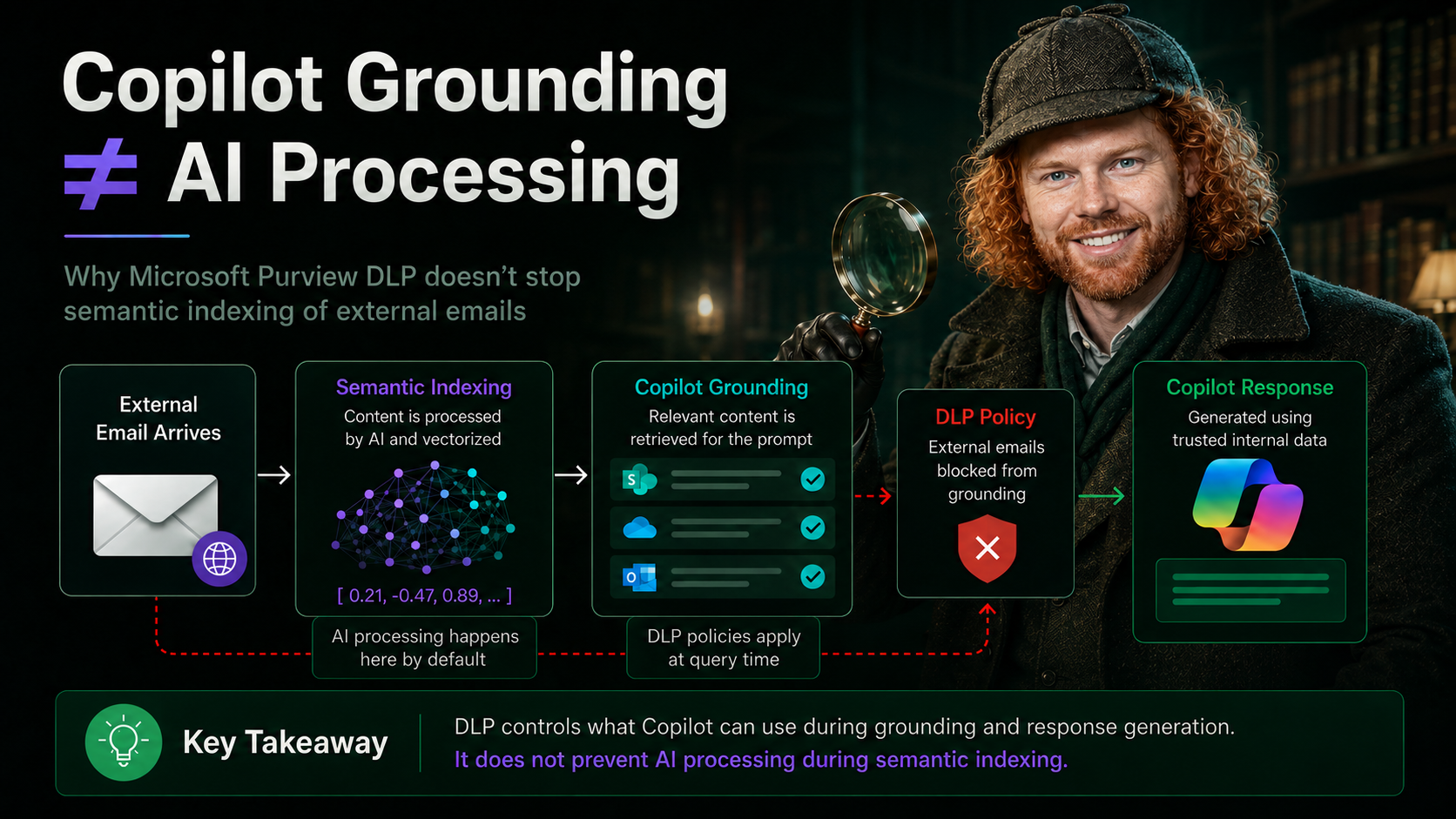
Copilot Grounding Controls Are Not an AI Processing Ban
Microsoft Purview is getting a new DLP control to exclude external emails from Copilot grounding. Here is what that actually means, what it does not mean, and why the distinction matters more than most governance discussions acknowledge.
Roadmap ID 548671 · MC1301714 · General Availability: July to August 2026 · Off by default
View Microsoft 365 Roadmap Feature 548671 →
Microsoft is expanding Microsoft Purview Data Loss Prevention for Microsoft 365 Copilot and Copilot Chat. Admins will be able to exclude emails from external senders from being used as grounding data during Copilot prompt processing. On the surface, this sounds like a simple statement: external emails can be kept out of Copilot. And that is where most conversations go wrong immediately.
That difference is not academic. It determines whether compliance statements made in board meetings, data protection assessments, or works council discussions are factually accurate or dangerously oversimplified.
What the New Control Does
Admins configure a DLP policy in Microsoft Purview targeting the Microsoft 365 Copilot and Copilot Chat location. The policy condition is „Email is received from people outside my organization.“ The action is to block Copilot from accessing those emails as knowledge sources.
Without the control: Copilot can draw on all relevant emails in the mailbox, including those from external senders.
With the DLP policy active: Copilot responds based on trusted internal Microsoft 365 sources only, such as internal Exchange content, SharePoint, and OneDrive.
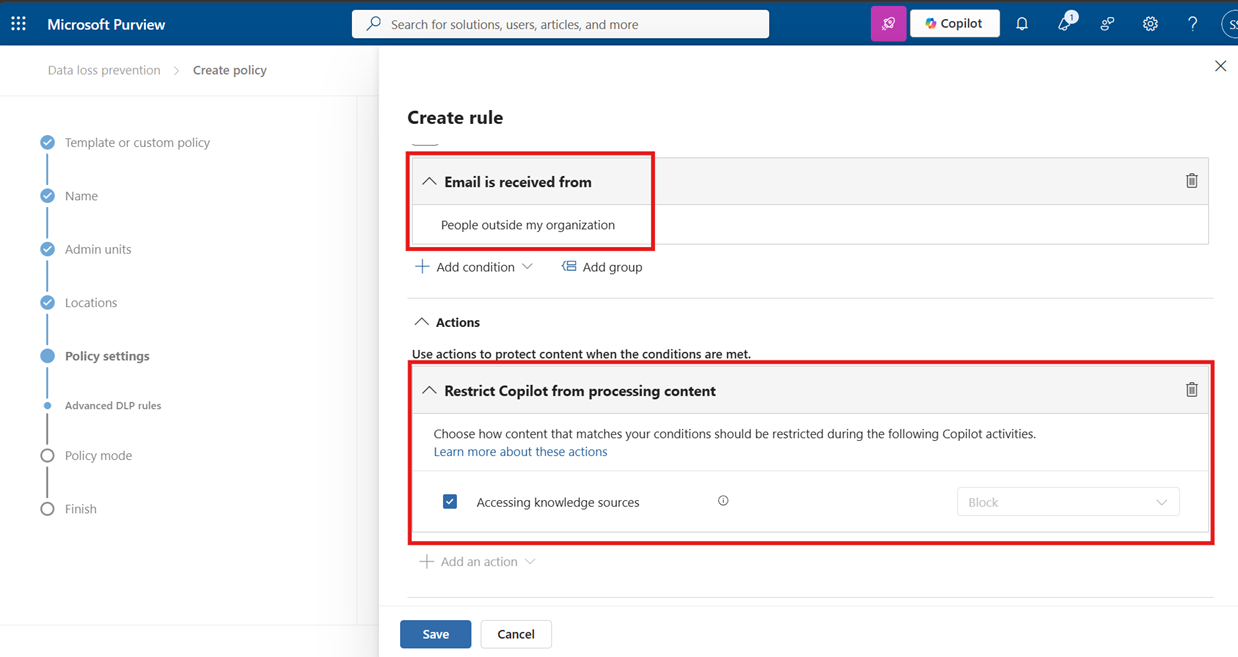
This does not mean the email was never indexed, never stored, or never touched by any AI-related processing. It means Copilot should not use that email as grounding data for a response when the DLP policy applies.
The Part Most Articles Skip: Vectorization Is AI Processing
This is the point that most governance discussions fail to address explicitly, and it is arguably the most important one.
For content to be findable by Copilot at all, it first has to be processed by the Semantic Index. And the Semantic Index does not work through keyword lookups. It works through vector embeddings.
When content enters Microsoft 365, it is automatically processed by AI language models to generate vector embeddings. These are numerical representations that capture the meaning, relationships, and context of the content, not just its text. The resulting vectors are stored in a multi-dimensional space where semantically similar content clusters together.
→
AI language model processes content
→
Vector embeddings generated
→
Stored in Semantic Index
→
DLP evaluated at query time
This indexing step happens before any user submits a Copilot prompt. It is AI processing by default, built into the platform, and it applies to content across SharePoint, Teams, Outlook, and OneDrive.
An external email that arrives in a mailbox may already have been processed by AI to generate vector embeddings before any DLP policy for Copilot is ever evaluated. The DLP control governs whether Copilot can surface that content in a response. It does not prevent the semantic vectorization that already happened at index time.
This matters enormously for any compliance or data protection discussion where the claim is „AI does not process this content.“ That claim cannot be supported by a Copilot DLP policy alone. The semantic indexing pipeline is a separate layer, and it runs independently.
Grounding and Vectorization Are Two Different Things
To be precise about what each layer does:
The new DLP control operates at query time. It prevents Copilot from retrieving and surfacing certain content when answering a user prompt. It does not operate at index time. The vectorization has already occurred.
„DLP restricts whether Copilot can use certain content during grounding and response generation.“
It does not mean:
„This content was never processed by AI.“
The Same Misunderstanding Applies to Sensitivity Labels
Microsoft Purview already supports DLP policies for Copilot based on sensitivity labels. For example, a policy can be configured so that content labeled „Highly Confidential“ is not used by Copilot in response generation.
A sensitivity label classifies content. It can apply protection settings such as encryption and access restrictions. But the label does not automatically exclude content from semantic indexing. That depends on separate configuration, architecture decisions, and the specific protection settings applied.
Why External Emails Are a Special Risk Category
External emails present a specific risk that goes beyond confidentiality. They can contain content designed to manipulate AI-generated responses:
Without the DLP control, Copilot could use this message as grounding context and generate a response that presents external, untrusted content as if it were internal and authoritative. The new control is specifically designed to close this vector.
DLP Is User-Scoped, Not Tenant-Universal
DLP policies are not static content switches. They are evaluated in context, per user, per policy scope, per condition. Different users can have different Copilot behavior for the same piece of content.
A DLP policy in Tenant A does not control Copilot behavior in Tenant B. If content is forwarded, exported, or synchronized elsewhere, the control context changes entirely.
The precise formulation is not „Copilot cannot use this.“ It is: „For users within this policy scope, Microsoft 365 Copilot and Copilot Chat are restricted from using this content as grounding data under the configured DLP conditions.“ Longer, but accurate.
Availability at a Glance
What This Control Does Not Replace
The new DLP capability is a valuable addition to a Copilot governance model, but it is one layer, not a complete solution. It does not replace:
The Clean Summary
The new external email control is a strong and welcome addition to Microsoft Purview. It addresses a real risk: untrusted external content influencing Copilot-generated responses. But it must not be oversold.
The precise, accurate statements are:

Schreibe einen Kommentar