
Microsoft Purview · Data Loss Prevention · Cross-Cloud
Four New Locations,
One Quiet Retirement
Box, Google Workspace, Dropbox and Salesforce now sit in the DLP policy wizard as locations of their own. The louder story is the location Microsoft is switching off behind them.
📌 TL;DR, the short version
- The DLP policy wizard now lists Box, Google Workspace, Dropbox and Salesforce as dedicated locations, right below the classic Microsoft 365 workloads.
- This is not an addition. The generic Instances location retires on 6 January 2027, and the dedicated locations are its replacement. If you have Instances based policies, you have a migration with a date on it.
- Purview still reaches those apps through Defender for Cloud Apps connectors. What moved into Purview is the policy definition and the enforcement model, not the plumbing.
- Non Microsoft 365 locations require pay as you go billing. The wizard says so, and the meter counts files, not users. 1,000 files equal one billable data asset.
- No simulation mode, no policy tips, no admin units, no mixing with SharePoint or Exchange in the same policy, and neither encrypted files nor PDFs are classified today.
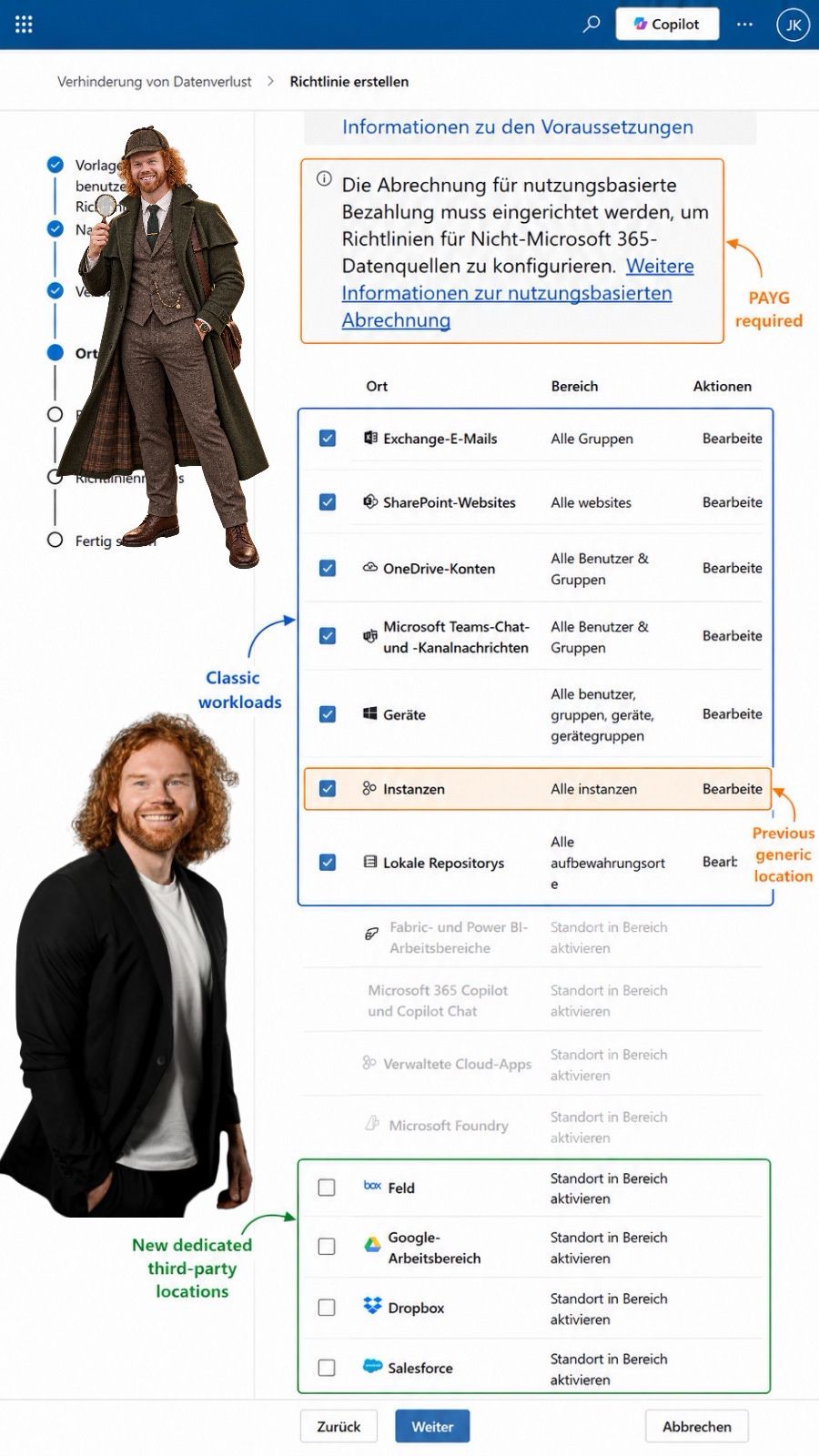
I was building an ordinary custom DLP policy. Template, name, admin units, next, next. Then the locations page loaded and something at the bottom of the list did not belong there.
Dropbox. Salesforce. Google Workspace. And an entry called Feld, which took me a moment.
None of this is secret. There is a message center post, there is documentation, there is a roadmap ID. But a wizard tells you what a product actually thinks it is, and this one has quietly changed its mind about what DLP covers.
Four names at the bottom of the list
Same page as Exchange and SharePoint. That is the whole point.
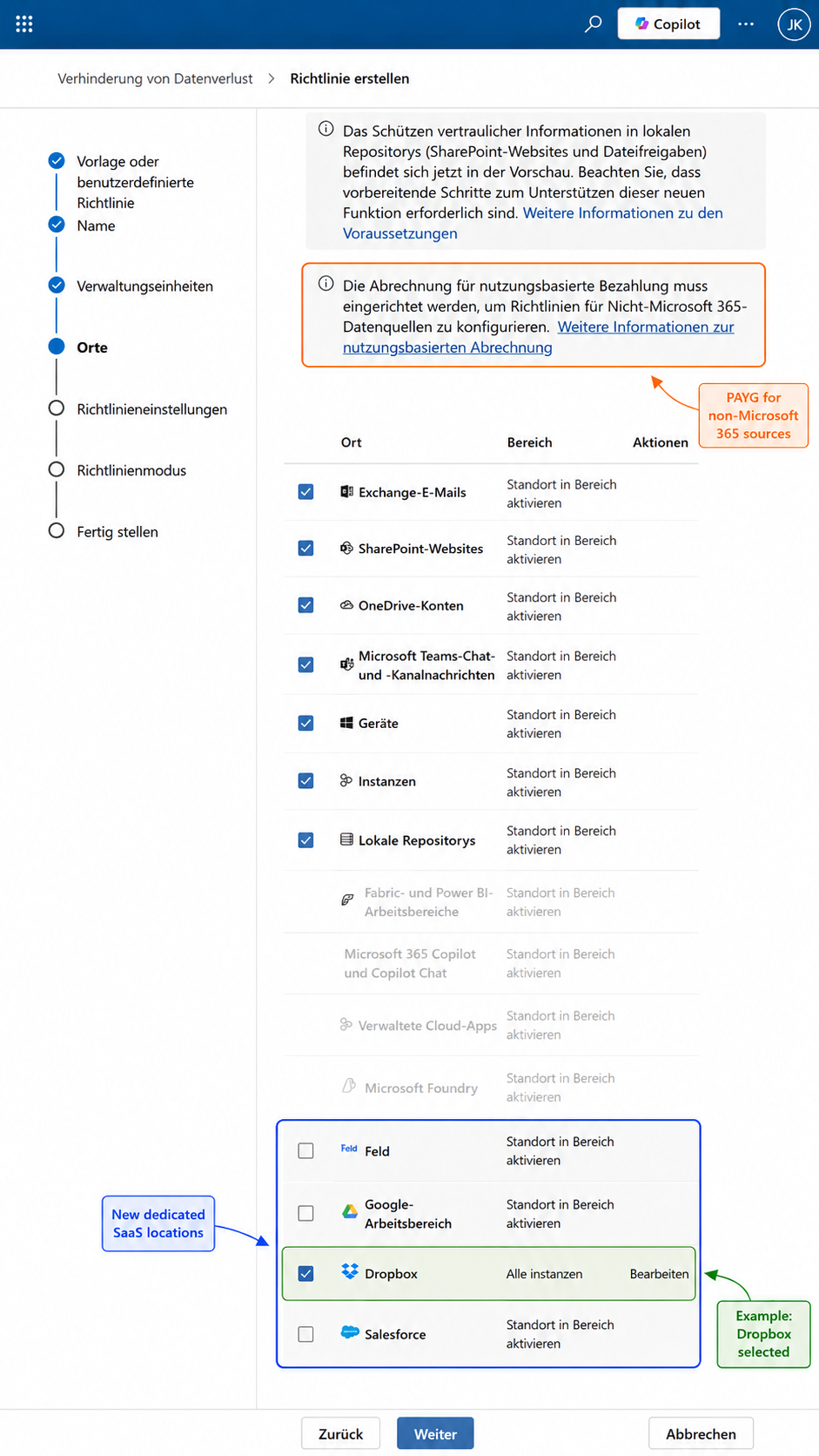
Until now, protecting a third party app meant switching on a location called Instances and then drilling into the app behind it. It worked. It was also abstract enough that most tenants never used it, not because anyone decided against it, but because nobody found it. Features that live behind a container get used by the people who read release notes. Features that appear in the wizard get used by everyone else.
Two footnotes on that list before we go further. The documentation currently confirms four supported apps for DLP, while the message center item MC1449180 names seven and adds ServiceNow, AWS and Cisco Webex. Rollout is phased per tenant, so your own wizard is the only reliable source. And auto labeling for these apps is narrower again, currently Google Workspace and Box only.
🔍 The entry called Feld
In a German language tenant, Box is not listed as Box. It is localised to Feld, the literal translation of the English word „box“. Only the product icon gives it away.
Harmless, and it will almost certainly be corrected. But if you are writing an operating procedure or training an admin team in German this month, reference the icon and the position in the list rather than the label, because both the wrong name and the corrected one will be wrong at some point.
The location that is being switched off
This is the part the announcement posts skip.
Microsoft is retiring the Instances policy location on 6 January 2027. After that date no new policies can be created against it, and existing Instances based policies are no longer supported. Instances relies on Defender for Cloud Apps file policy infrastructure for enforcement. The dedicated locations move that enforcement into Purview’s own model, which is exactly why both cannot survive.
So this is not four new checkboxes. It is a replacement path with a deadline, and right now the old and the new sit in the same list.
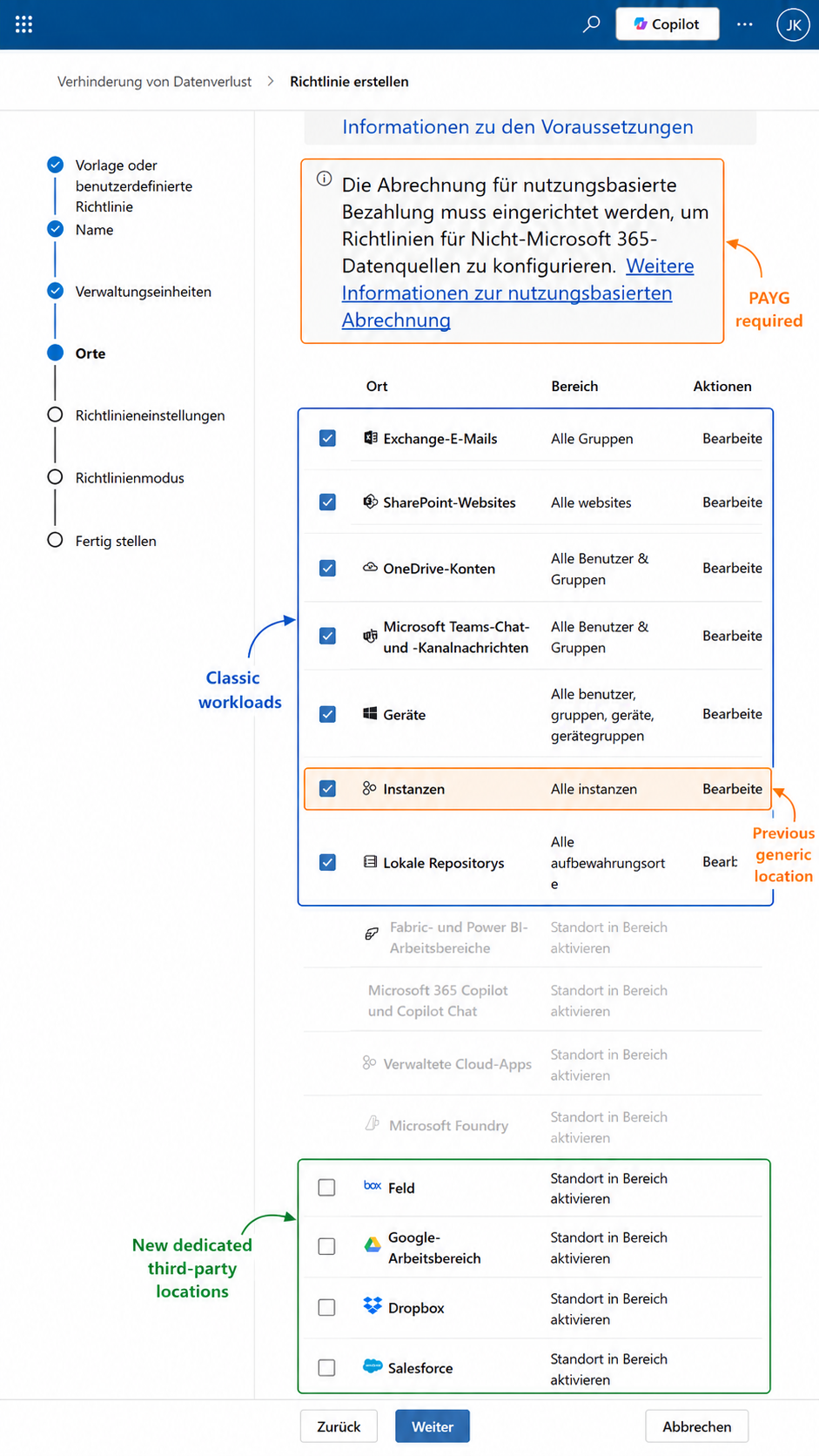
Count the concepts in that screenshot. Instances. Managed cloud apps, greyed out in my tenant. And the four dedicated locations. Three overlapping ways of thinking about non Microsoft coverage, on one page, in one wizard. That is what a platform mid migration looks like, and it is a good reason to document which construct your policies actually use before the retirement date asks you the question.
Now compare that screenshot with Exhibit A. When Dropbox is scoped, the Microsoft 365 workloads no longer carry editable scopes. When the classic workloads are scoped, the third party locations sit unselected. The wizard is enforcing a documented rule in the interface: non Microsoft app locations combine with each other, never with Exchange, SharePoint, OneDrive, Fabric or Devices in the same policy.
Which means a second family of policies. Plan the naming convention and the ownership before you create the first one, not after the twelfth.
What the rules can actually do
More than content inspection, and less than you are used to.
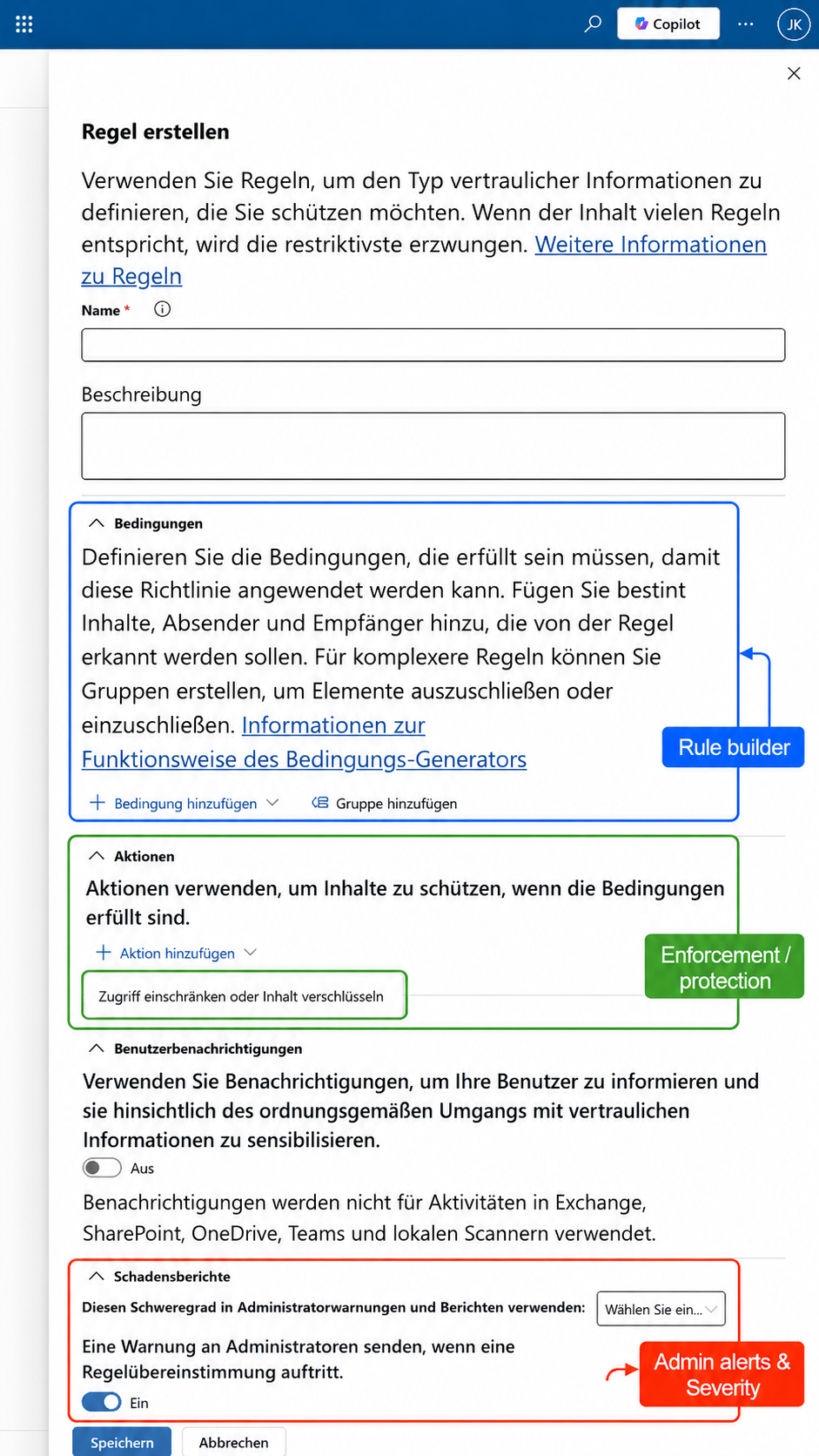
The condition list is the screenshot I would show anyone who still thinks DLP means finding a credit card number and blocking the mail. It mixes several very different signal families.
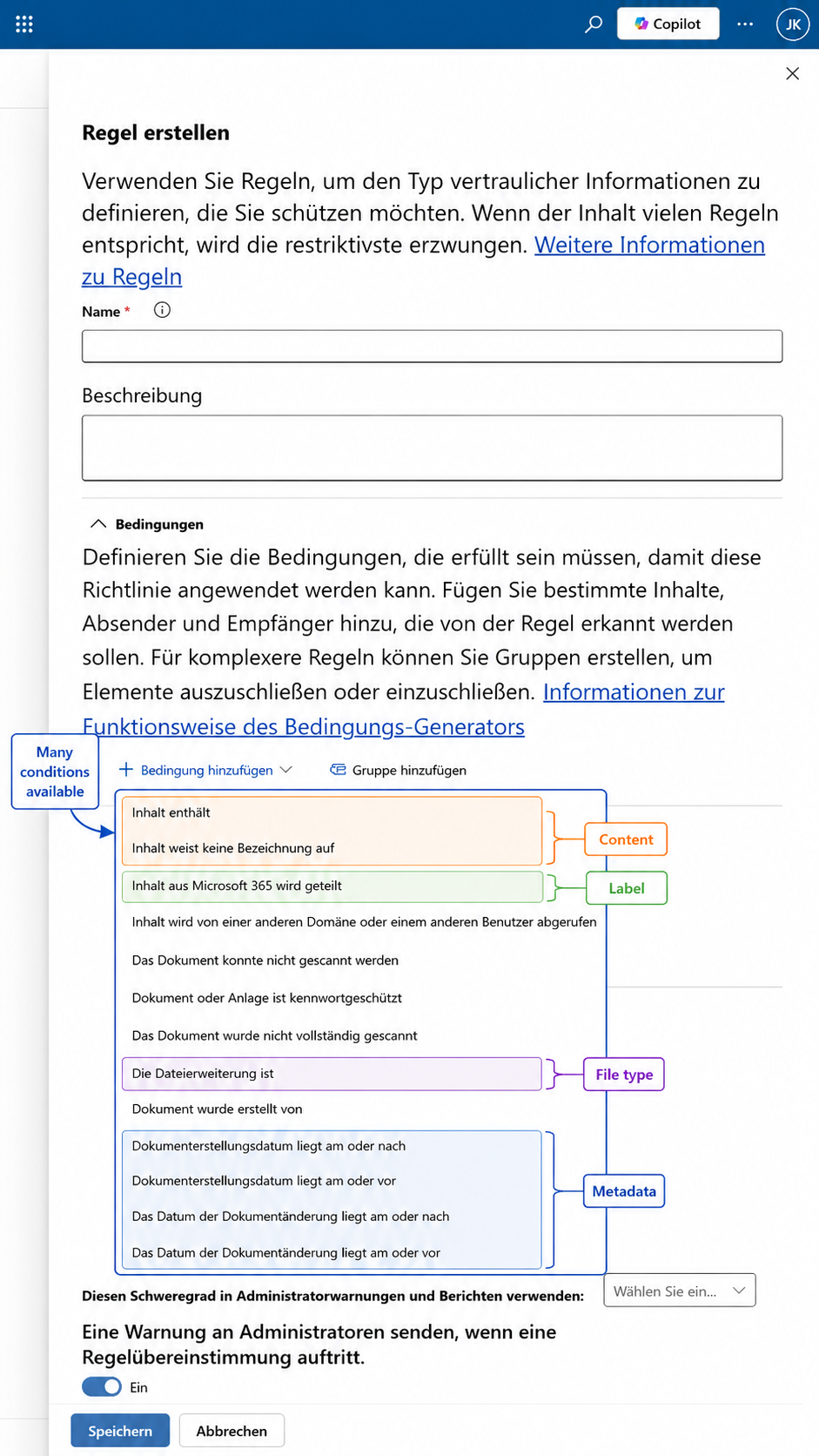
The two I would build first are the least glamorous ones: document could not be scanned and document was not fully scanned. Given that encrypted files and PDFs are not classified in these apps today, those conditions are the difference between knowing where your blind spot is and quietly assuming you do not have one.
Two honest caveats. That list is short, roughly twelve conditions against the very long catalogue you know from Exchange or SharePoint policies. And one entry reads „content from Microsoft 365 is shared“, which is a strange thing to find in a Dropbox policy and a good hint that this condition set was adapted rather than purpose built. Test what each condition evaluates in your target app before you rely on it. Attribute availability also differs per app: created date, for example, is not available in Dropbox.
It enforces, and it alerts
The action set includes restricting access and encrypting content, so this is not a reporting exercise. And the rule carries a severity for admin warnings plus an alert on rule match, which lands in the same DLP alerts dashboard as everything else. Activity Explorer covers these policies too. Content Explorer does not.
The invoice nobody puts on the slide
Scope selection is now a cost decision.
The wizard states it plainly: pay as you go billing must be configured to create policies for non Microsoft 365 data sources. Purview runs two complementary models. Per user licensing covers Microsoft 365 and Windows or macOS endpoints and is unchanged. Pay as you go is consumption based, requires the tenant to be linked to an active Azure subscription, and requires an explicit consent step. Without that consent, the feature is simply not available to you.
For this capability the meter is Purview At Rest Protection, and the unit of measure for at rest files in non Microsoft apps is 1,000 files equal one data asset. Check the current price per asset on the Purview pricing page before you quote anything. The shape matters more than the number: your bill scales with the volume of files you bring into scope, not with the users you licensed. A broad „protect everything in Box“ policy and a narrow policy on two high risk instances produce very different invoices for the same screenshot.
Enterprise tier Purview licensing remains a prerequisite on top of the metered charges. This is additive cost, not a substitute.
Where the boundary still runs
The management experience moved. The integration model did not.
Purview is not talking natively to Box or Salesforce. Before you can apply a policy to one of these apps, that app has to be connected to Microsoft Defender for Cloud Apps through an app connector, and Purview uses those existing connectors to reach it. The connector layer did not disappear. What changed is where policy is defined, classified and enforced.
DEFINES
Microsoft Purview
Policy, classification engine, sensitive information types, labels, enforcement actions, alerts and Activity Explorer. One policy surface across Microsoft and non Microsoft locations.
REACHES
Defender for Cloud Apps
The app connector to the SaaS platform. A prerequisite, not an optional extra, and the first thing to plan in any design document.
⚠️ Do this before you enable anything
Turn off or delete any existing Defender for Cloud Apps file policies that target the same non Microsoft locations before the Purview policy goes live. Running both at once can cause unexpected enforcement. Combined with actions like restrict access, this is the most likely way to break a production environment with this feature.
What is still missing
The list that decides whether your rollout plan survives contact with the tenant.
| Constraint | What it means for you |
|---|---|
| Custom template only | The predefined Financial, Medical and health, and Privacy templates do not support these locations. You build from scratch. |
| No simulation mode | You cannot test before you enforce. With restrict access in the action list, this is the single biggest operational risk. Start narrow and start with alerting. |
| No mixing with Microsoft 365 | Non Microsoft locations combine with each other only. Expect a parallel policy set and the governance overhead that creates. |
| Advanced rules only | Simple policy settings are not offered. Every rule is an advanced DLP rule. |
| No policy tips, no overrides | No in app guidance and no business justification workflow for users. |
| No administrative units | Scope is full directory. If your compliance model depends on admin units, it does not apply here. |
| No Content Explorer | You cannot browse or inspect content in these apps. Activity Explorer and DLP alerts do work. |
| Encrypted files and PDFs | Both are documented as not supported for classification. PDF is not a niche format, so be honest about coverage claims. |
The PDF gap and the missing simulation mode are the two I would raise first in any customer conversation. The first decides what you can credibly claim about coverage. The second decides how you have to sequence the rollout. And the whole feature still carries the preview banner, with general availability starting early September 2026 and completing in late October according to the message center.
Five minutes in your own tenant
- Open the DLP locations page and check which of the third party entries your tenant actually shows. Phased rollout means the documentation is not the answer, your wizard is.
- Filter your policy list for anything scoped to Instances. That is your migration backlog, and it expires on 6 January 2027.
- Open Defender for Cloud Apps and list the file policies targeting the same apps. Those have to go before the Purview policy goes live.
- Check whether pay as you go consent exists and whether the tenant is linked to an Azure subscription. If procurement is not in the room, the pilot stalls here.
- Estimate the file count per connected instance. 1,000 files equal one data asset, so the scope decision and the invoice are the same decision.
- Decide who owns cost monitoring in Azure Cost Management. This is the question nobody asks until month two.
What this actually signals
Stripped of the screenshots, the direction is consistent with everything else Purview has shipped in the last two years. One classification engine, one policy surface, progressively more data sources pointed at it, and the connector ecosystem demoted to plumbing. Retiring Instances rather than maintaining it alongside the new model is the strongest evidence that Microsoft means it. Consolidation is harder than addition, and it is the part customers feel.
The commercial boundary, meanwhile, is drawn very precisely. Per user for Microsoft 365, metered for everything else. The wizard blurs the technical line between Microsoft and non Microsoft workloads while the billing model keeps it perfectly sharp. Both things are true at once, and only one of them shows up in a demo.
So: four new locations, one retirement with a date, one connector prerequisite that has not gone anywhere, and a meter that counts files. The work is not to admire the new entries in the wizard. It is to separate the management experience from the integration model in every conversation, resolve the billing question before the technical one, and say plainly which file types are actually being classified.
Case closed 🔍 until the next Purview detail nobody documented.
↳ Straight to the documentation
- Microsoft LearnDLP policies for non-Microsoft connected apps (preview)
- Microsoft LearnUse DLP policies for non-Microsoft cloud apps
- Microsoft LearnLearn about Microsoft Purview billing models
- Microsoft LearnConnect apps with Microsoft Defender for Cloud Apps
- Microsoft LearnLearn about data loss prevention
- Microsoft 365 RoadmapID 568075, DLP and auto-labeling for non-Microsoft apps

Schreibe einen Kommentar