
Microsoft Purview · Communication Compliance · Alerting
The Alert PolicyYou Never Created
Every Communication Compliance policy quietly creates a twin somewhere else in Purview. Mine ended up with a name that made me laugh, and then made me check four tenants.
- Case file
- Communication Compliance
- 7 min read
📌 TL;DR, the short version
- Creating a Communication Compliance policy also creates an alert policy named CC_<policy name> in the Alert policies list. You do not create it, and you do not get asked.
- The prefix is added blindly. Name your policy CC_Testpolicy and you get an alert policy called CC_CC_Testpolicy.
- It watches the audit stream for
SupervisionRuleMatchevents carrying your policy name, and it aggregates them. - That aggregation is the trap. A few matches inside the window produce policy matches, but no alert and no email, which looks exactly like a broken policy.
- Policy names cannot be changed after creation. So the alert policy name, and every filter and SIEM rule built on it, is stuck with whatever you typed on day one.
I was doing something completely unspectacular: cleaning up a demo tenant. Filter the Alert policies list, delete the test artefacts, done in five minutes.
Then I typed cc into the search box and found five items. Four of them were alert policies I had definitely never created. One of them had a name that no human being would ever choose.
Exhibit A: four policies I never wrote
Same tenant, same prefix, one very suspicious duplicate.
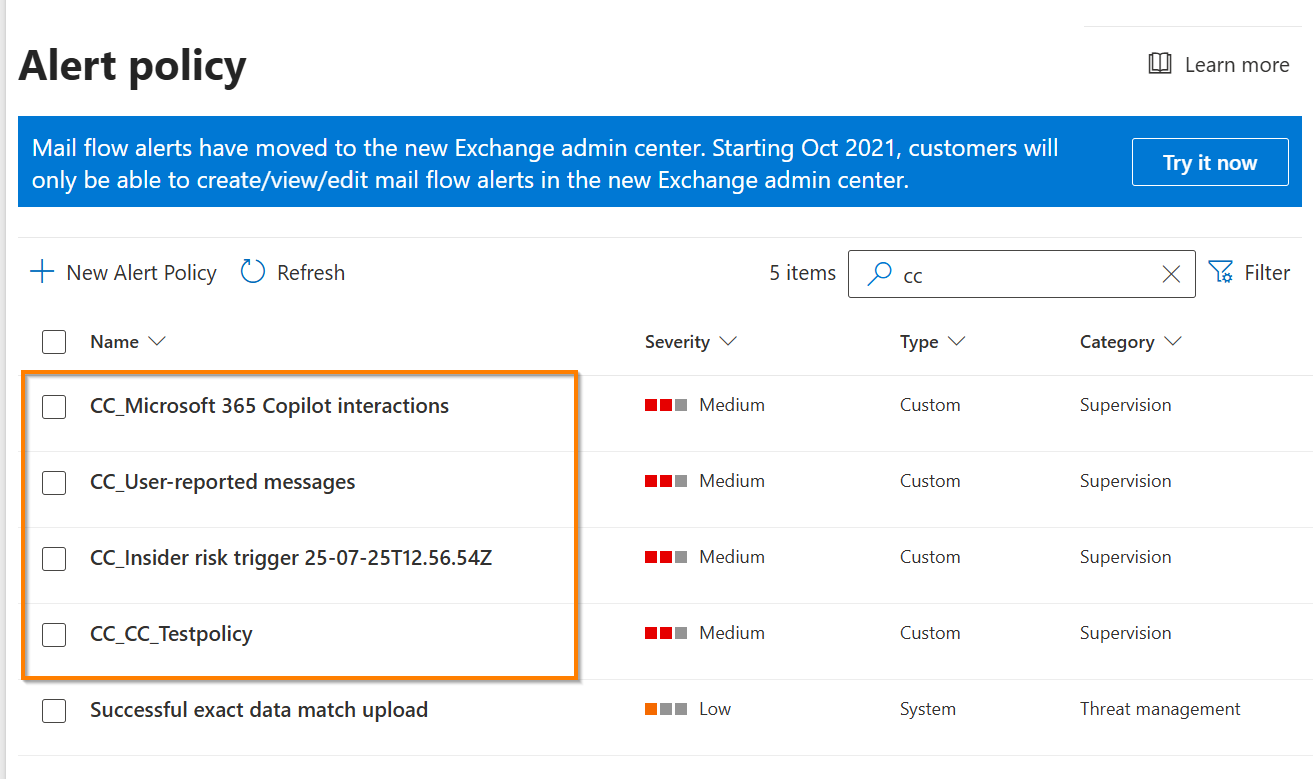
Four alert policies, all of them tagged Supervision, which is the historic name of the solution we now call Communication Compliance. And every single name started with CC_.
So I opened the Communication Compliance solution and compared the two lists. The answer was immediate and slightly anticlimactic.
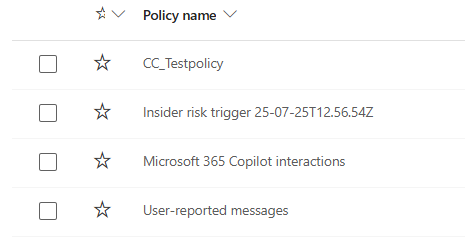
One Communication Compliance policy, one alert policy. Including the ones Microsoft provisions for you, such as User-reported messages, the Copilot interactions policy and the policy that gets generated when Insider Risk Management triggers a communication scope.
And then there is the entry that gives the whole thing away. My test policy is called CC_Testpolicy, because past me thought a prefix would be tidy. The system does not check whether a prefix is already there. It just adds its own.
🔍 The duplicate prefix
Policy name: CC_Testpolicy
Generated alert policy: CC_CC_Testpolicy
Harmless, funny, and a perfect reminder that this naming is machine generated, not curated.
Exhibit B: what is actually inside that policy
The interesting part is not the name. It is the threshold.
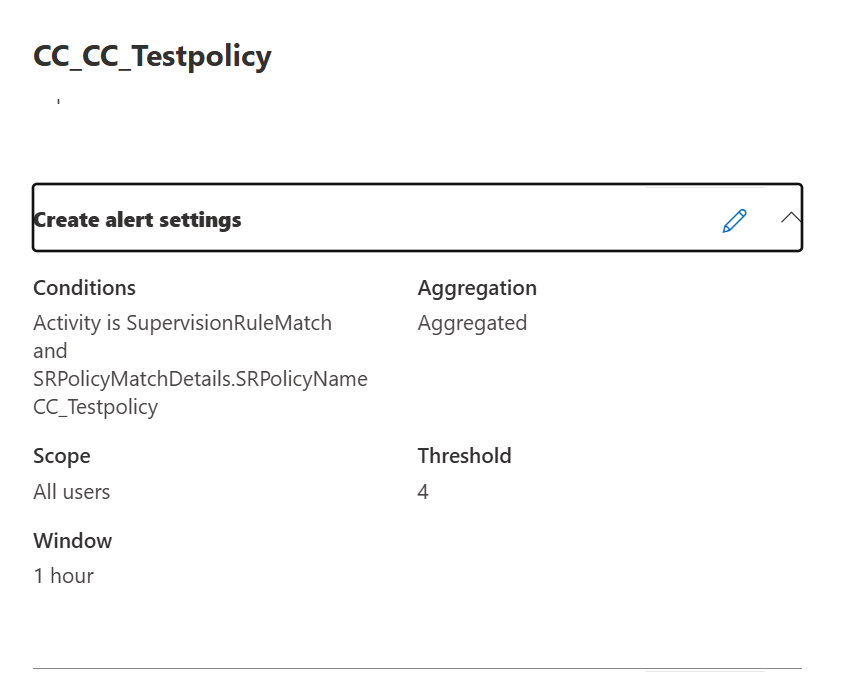
| Condition | Activity is SupervisionRuleMatch and SRPolicyMatchDetails.SRPolicyName equals the name of your Communication Compliance policy |
|---|---|
| Category | Supervision, the legacy name of the solution |
| Type | Custom, not System, which is why it shows up next to policies you built yourself |
| Severity | Medium |
| Aggregation | Aggregated, so single matches are collected rather than escalated |
| Threshold and window | 4 detections within 1 hour in this tenant |
| Scope | All users |
SupervisionRuleMatch is the same operation you find in the Unified Audit Log under the record type ComplianceSupervisionExchange. So the alert policy is not doing anything mystical. It watches the audit stream for matches that carry the name of your policy, counts them, and escalates once the counter passes the threshold.
Policy match
A message hits your conditions. Communication Compliance captures it and files it for review.
Visible in the policy, Pending tabAlert
Enough matches have accumulated inside the window. Now an alert object is created and the reviewers get an email.
Visible in Alerts, plus emailMicrosoft states this quite plainly in the documentation: an alert is not the same thing as a policy match, and an alert generally consists of several matches. Once the required number of matches is reached, the alert is created and the mail goes out.
Which produces the situation that costs people an afternoon: a reviewer tests the policy, sends three messages, sees nothing in the Alerts view, and concludes that Communication Compliance is broken. It is not. The matches are sitting in the policy, patiently waiting for a fourth friend to arrive within the same hour.
If that pattern feels familiar, it is the same story I ran into on the DLP side, where an audit record shows a rule match while the alerts dashboard stays completely quiet: Purview Saw It. So Where Is My Alert? Different workload, identical lesson. Detection and escalation are two separate decisions.
Why a machine generated name is a governance problem
Communication Compliance policies cannot be renamed after creation. You can delete them, you can rebuild them, but the name you typed in the wizard is permanent. And because the alert policy inherits that name, the consequences travel further than most people expect: into the alert policy list in Purview and Defender, into the alert title your reviewers see in their inbox, into every SIEM correlation rule, KQL filter and ticket routing rule built on top of it, and into the mental model of whoever inherits the tenant from you in two years.
My working rule since this cleanup: no prefixes in Communication Compliance policy names, because the system already owns the prefix space. Instead, name the policy after the risk and the audience, for example Insider trading, trading floor, Teams and Exchange. That reads well as a policy, and it still reads well once CC_ is bolted onto the front of it.
What you can touch, and what you should not
The alert policy is editable. That does not automatically make editing it a good idea.
Because these entries are typed as Custom rather than System, the portal offers an edit pencil, and Security and Compliance PowerShell exposes them through Get-ProtectionAlert. Severity, notification recipients, threshold and time window are the fields people usually want to change, for example to raise a policy for a regulated group to High, or to widen the window for a low volume scope. Three things are worth knowing before you start tuning.
- Test the change, do not assume it. Microsoft documents that
Set-ProtectionAlertcannot edit default alert policies, and these entries sit in an unusual middle ground: generated by a solution, typed as Custom. Verify the result in a test tenant before you roll a script across production. - Give it time. Alert policies generally need up to 24 hours to sync to the detection engine after they are created or updated. If you tune the threshold and immediately fire your test messages, you may be measuring the old configuration.
- Do not delete the alert policy to silence a noisy policy. Deleting the alert path does not stop the matches, it only removes the escalation. You end up with a policy that still collects material for review while nobody is told to look at it, which is the worst of both worlds in an audit.
Microsoft is also moving alert configuration into the Communication Compliance policy wizard itself, so that alert frequency and recipients can be set per policy instead of being handled in a separate list. The rollout timeline for that public preview has moved several times, so treat it as a direction of travel rather than something to plan a go live around. Until it lands, the alert policy list stays part of your Communication Compliance documentation.
Five minutes in your own tenant
- Open Alert policies and filter for
CC_. The count should match your Communication Compliance policy count exactly. - One extra entry usually means a deleted policy left an orphan behind. One missing entry is worth a support case.
- Check the threshold and window against the realistic match volume of each scope. Four matches per hour is a very different bar for a trading floor than for a ten person HR pilot.
- Check who is on the notification list, and whether those people still work in that role.
- Look for double prefixes. If you find one, it is a naming convention question, not a bug.
None of this is a defect. It is Purview doing exactly what it promised, in a place most people never look, under a name nobody chose. Which is roughly the definition of a compliance control that quietly stops matching reality.
My favourite part is still the name. Somewhere in a production tenant right now there is an alert policy called CC_CC_Compliance_CC_Monitoring, and one day somebody will have to explain it in an audit interview with a completely straight face.
Case closed 🔍 until the next Purview detail nobody documented.

Schreibe einen Kommentar