
Microsoft Purview · DLP · Audit · Alerting
So Where Is My Alert?
The curious case of a DLP rule match that never seemed to become an alert, and what it tells you about how Purview really works.
📌 TL;DR, the short version
- A rule match is a detection. A DLP alert is an escalation decision your configuration makes about that detection.
- Audit and Activity Explorer answer what happened. The alerts page answers what somebody should look at. Two different questions.
- Six things regularly sit between a match and a visible alert: no alert configured, simulation mode, default aggregation, an unmet threshold, propagation time, and the wrong portal or scope.
- Check the rule, then the aggregation, then Defender. Only then start blaming Purview.
Sometimes Microsoft Purview gives you exactly the evidence you were looking for. And somehow that creates even more questions.
I was testing a DLP policy when the Audit log handed me a pretty clear result. Everything I needed was on the record.
Evidence collected
1 of 6 missingOpened the alerts page. Refreshed it. Widened the time range. Still nothing.
And that is where this stopped being a simple DLP test and became a much more interesting question: if Purview knows that my rule matched, why does Purview not alert me about it?
My first instinct was one of those classic cloud moments. Propagation delay. A forgotten checkbox. Maybe permissions.
But while digging into it, I realised the interesting part was not why this alert was missing. It was that I had quietly been treating two completely different things as if they were the same thing.
Stage 1
DLP rule match
Purview evaluated content, found what the rule was looking for, and wrote it down.
DetectionStage 2
DLP alert
Purview decided, based on your configuration, that a human should be told about it.
EscalationThey are related. They are definitely not the same. So let us open the case file. 🔍
Exhibit A: Purview definitely saw it
Detection is the easy part. It usually just works.
On August 5, the Audit log recorded a DlpRuleMatch for the policy No external mailing and the rule Confidential content. Sender, recipient, workload, timestamp, all of it documented down to the second.
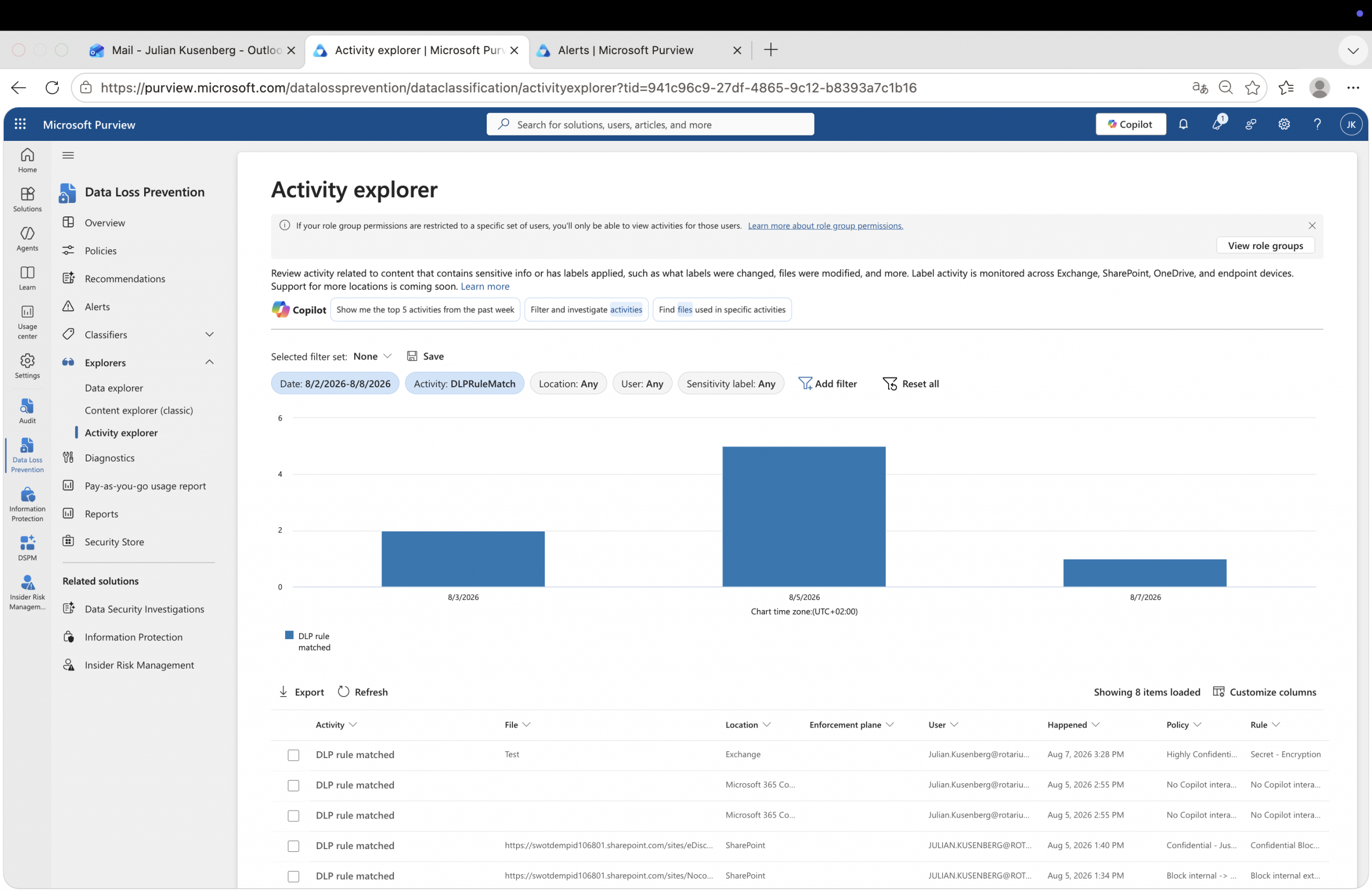
So detection clearly worked. Which raises the obvious follow up question: if the rule matched, should the next logical step not be an alert? That assumption is exactly where this gets interesting.
Exhibit B: The alert that is not there
Same tenant, same time range, two views that flatly disagree.
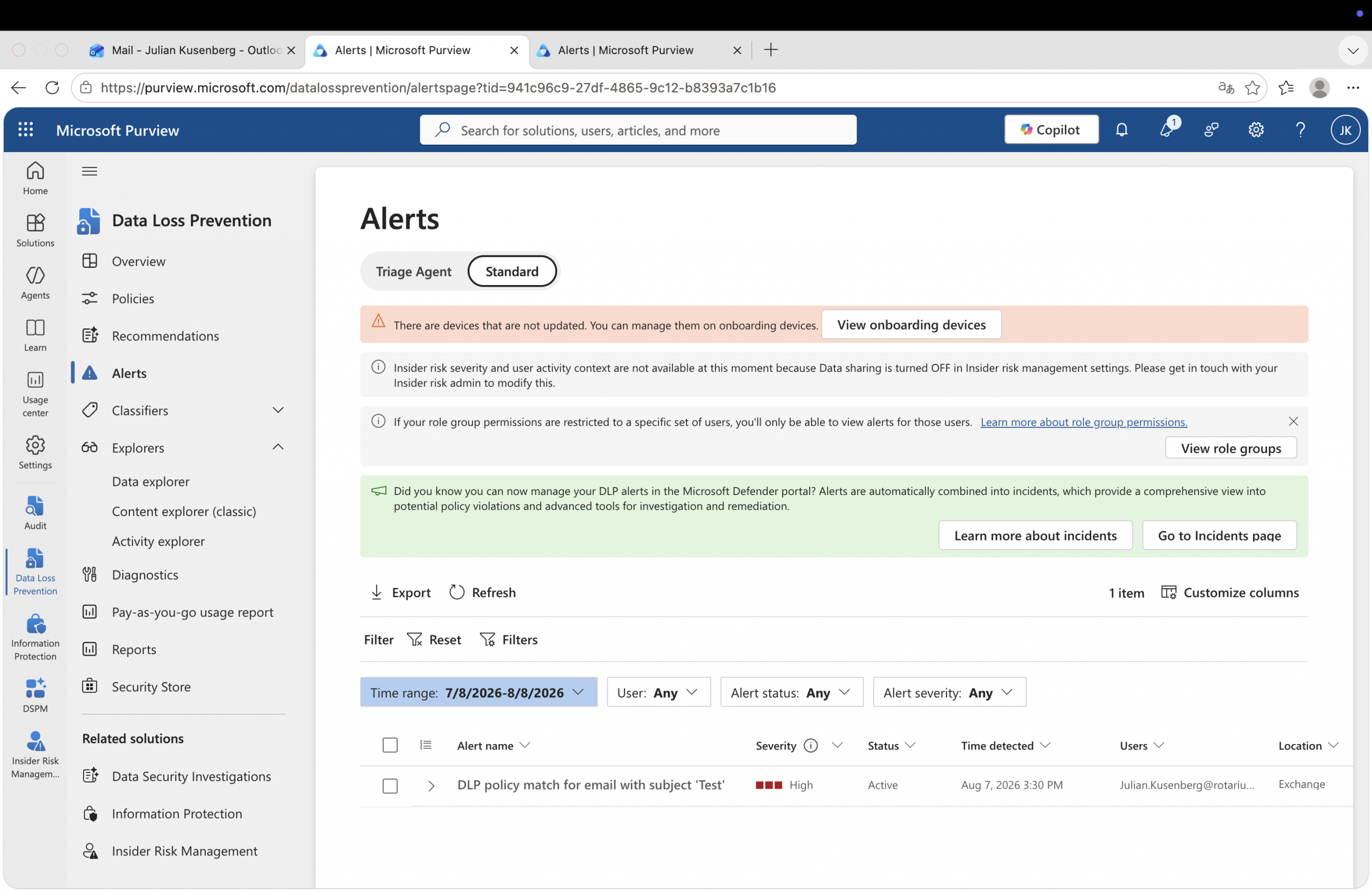
Detection is not escalation
One sentence that reorganises the whole mental model.
A rule match tells you that Purview detected something.
A DLP alert tells you that Purview decided, based on your configuration, that this detection should be escalated to a human.
Microsoft is quite explicit about this in the DLP policy reference: a rule can match an item even when no actions are performed, and the alerting behaviour lives in a separate part of the rule called incident reports. Two stages, two configuration surfaces, two very different meanings.
From activity to incident, and where you can see each stage
And suddenly my missing alert was not quite so mysterious anymore. The evidence had been collected. It simply never passed through the part of the pipeline that decides whether anybody gets told.
The six usual suspects
In the order I actually check them, with how often each one is the answer.
01No alert was configuredvery common
Alerting sits in the incident report settings inside the rule. It is not an automatic consequence of a match. A rule can happily match, apply its actions and write to the Audit log while the administrative alert stays switched off. If somebody built that rule for enforcement rather than for monitoring, this is usually the whole story.
02The policy is in simulation modevery common
This one catches nearly everybody at least once. In simulation a policy behaves as if it were enforced, matches are generated and alerts are created. Microsoft just keeps those alerts somewhere else on purpose.
Simulation alerts appear only in the simulation alerts tab of that policy. They do not show up in the DLP alerts console, and they do not flow into the Defender portal at all. Perfect evidence, deliberately filed in a different drawer. See Learn about DLP simulation mode.
03Aggregation quietly absorbed itcommon
Another match does not necessarily mean another alert. By default, events from a single rule that occur close together are folded into one alert: a 60 second window with E5, 15 minutes with E3. Those default windows are not configurable by the admin.
On top of that, a tenant can enable user based alert aggregation, grouping matches per user and per rule inside a configurable window of 15 to 60 minutes. And alert emails, incident reports and user notifications are only sent once per document, even if the same document trips the condition twice.
04The threshold was never reachedcommon
If the rule uses aggregate event alerts instead of single event alerts, one match is by definition not enough. The alert fires when a defined number of matches or a defined volume of data is reached inside a window you configure at rule level, between 60 and 999 minutes.
Two details worth remembering: threshold based aggregation only works when the rule applies to all users, and configuring it at all depends on your licensing. Both are documented in Get started with DLP alerts.
05Timing, and the rule you think matchedcommon
After you create or modify alert settings in a DLP policy, it can take up to three hours before alerts are actually generated. If you tuned the policy and immediately ran your test, patience is the entire fix.
There is a second trap here. When an item matches several rules, all of those matches are recorded in the Audit log and in the reports, but only the highest priority, most restrictive rule is enforced. The rule you spotted in Audit is not necessarily the rule that owned the outcome.
06You are looking in the wrong windowunderrated
Microsoft now points to Defender XDR as the place to investigate and manage DLP alerts, while Purview stays the place to author policies. Your DLP signal can already be part of a broader Defender incident while the Purview dashboard still looks perfectly calm.
Scope matters too. An administrative unit restricted admin only sees alerts and events from policies scoped to that unit. And how long an alert stays visible in the console is governed by your audit log retention configuration, which tends to surprise people during longer investigations.
⏱ The clocks that decide whether you see an alert
The dashboard is not the truth. It is a view of the truth.
Four interfaces, four completely different questions.
This little investigation reminded me how risky it is to treat one Purview interface as the source of truth for everything. Audit, Activity Explorer, DLP alerts and Defender incidents all look at related activity. They just answer different questions.
Audit
Did something actually happen, and can I still prove it later?
Activity Explorer
What is Purview detecting across my environment right now?
DLP alerts
Which of those detections were escalated for a human to review?
Defender incident
Is this part of a bigger security or data risk story?
Once I started thinking about Purview this way, the original mystery almost solved itself. An empty alerts page is not a claim that nothing happened. It is a statement about escalation, and nothing more.
Next time this happens
A short investigation order, not a six page checklist.
✅ Audit says „DLP rule matched“ and the alerts page stays quiet
Only after that do I start blaming Purview. 😄
The alert was not missing after all
The funny thing about this investigation is that I started with the wrong question. I wanted to know: where is my alert? The better question was: why did I expect this rule match to create one?
That small distinction says a lot about how Microsoft Purview DLP actually works. Audit records the evidence. DLP evaluates what to do with it. Alerting decides whether someone needs to care. And Defender may eventually connect that signal to a much bigger story.
So the next time Purview tells you „DLP rule matched“ and the alerts dashboard looks completely unimpressed, do not immediately assume something is broken.
Your evidence might be perfectly valid. You may just be looking for it in the wrong part of the investigation.
Case closed 🔍 … at least until the next Purview mystery.

Schreibe einen Kommentar